Stop Overpaying: A Small Business Guide to Credit Card Processing Fees
Most small businesses overpay 20-40% on credit card processing fees without realizing it. This guide shows you exactly how to cut costs and reclaim thousands of dollars annually through smarter payment processing strategies.
As a small business owner, you watch every dollar. You negotiate with suppliers, cut utility costs, and optimize your staffing. Yet, when it comes to the fees you pay to accept credit cards, you might be leaking thousands of dollars a year without realizing it.
Many business owners assume these credit card processing fees are set in stone, just like taxes. They aren't.
It is painful to see a customer buy $100 worth of goods, only to have significantly less land in your bank account. It is even more frustrating when a competitor next door, or a friend with an online store, tells you they are selling the same volume but paying 20% less in fees.
The payments industry thrives on complexity. However, you don't need a finance degree to optimize your costs. Below is a breakdown of why you might be overpaying and exactly how to fix it, whether you sell in-store or online.
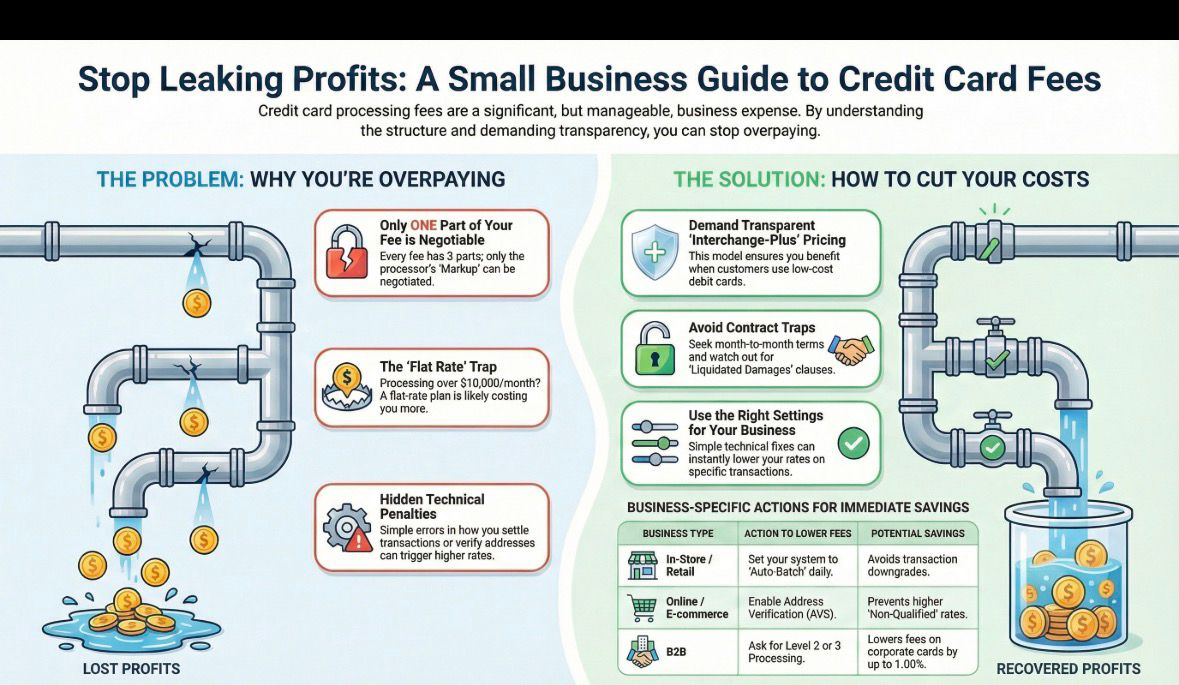
Where Does Your Money Actually Go? Understanding Credit Card Processing Fees
To cut costs, you first need to understand the fee structure. As explained in our complete guide on credit card processing fees, every transaction fee is split into three buckets:
Interchange (The Bank's Cut): This fee goes to the bank that issued your customer's card (such as Chase or Citi). It covers their risk and funds the rewards programs your customers love. You cannot negotiate this.
Assessment Fees (The Brand's Cut): A small percentage (approximately 0.14%) goes to Visa or Mastercard for operating the network. You cannot negotiate this.
The Markup (The Processor's Cut): This portion goes to the company processing your payments. This is 100% negotiable.
The Core Issue: If your payment processor bundles these three components together, a pricing model often called "Tiered," "Blended," or "Flat Rate", they can easily hide a massive markup behind the scenes. This is where you're likely overpaying.
The "Flat Rate" Trap: Are You Too Big for Square or Stripe?
Many small businesses launch with providers like Square, Stripe, or PayPal. These companies typically charge a simple "Flat Rate" (e.g., 2.9% + 30¢). While convenient, this pricing model isn't always cost-effective as you scale.
| Monthly Processing Volume | Best Pricing Model | Typical Savings Opportunity |
|---|---|---|
| Under $5,000 | Flat Rate (Square, Stripe, PayPal) | Minimal - simplicity justifies slightly higher rates |
| $5,000 - $10,000 | Consider switching to Interchange-Plus | 10-15% potential savings |
| Over $10,000 | Interchange-Plus pricing (professional merchant account) | 20-40% potential savings |
When Flat Rate Works: If you process less than $5,000 a month, flat-rate providers are excellent. You typically pay no monthly fees, and the simplicity justifies the slightly higher transaction rate.
When to Switch: Once you cross the $5,000–$10,000 monthly threshold, you are likely overpaying. A proper merchant account using "Interchange-Plus" pricing usually lowers your effective rate significantly because you stop subsidizing smaller merchants.
Check your monthly statements. If your volume consistently exceeds $10,000, it is time to move to a professional merchant account with transparent interchange-plus pricing. For detailed comparisons, see our payment processor fees guide.
Technical Penalties Costing You Money: Online vs. In-Store Payment Processing
Beyond the pricing model, there are technical reasons you might be paying a "penalty" rate. These hidden costs differ depending on how you accept payments. For a deeper dive into these differences, read our guide on online vs. in-store payments.
If You Sell In-Store (POS / Retail)
For physical stores, restaurants, and service providers using a terminal, two common issues drive up credit card processing fees:
1. The "Settlement" Penalty: If you do not "settle" (finalize) your transactions within 24 hours, Visa and Mastercard may downgrade the transactions and charge a higher interchange rate.
The Solution: Ensure your Point of Sale (POS) system is set to Auto-Batch every night. Never leave a batch open for more than 24 hours. This simple step can save you 0.5-1% per transaction.
2. The Equipment Leasing Pitfall: This is a common trap for retail businesses. Sales agents often push long-term leases for credit card terminals.
Warning: Never lease a credit card terminal. You could end up paying $2,000 for a device worth $300 over a 4-year non-cancellable lease. Always buy your equipment outright. Modern terminals cost between $200-$500 when purchased directly.
If You Sell Online (E-Commerce)
For digital shops and remote billing, risk management directly impacts your ecommerce payment processing fees:
1. The "AVS" (Address Verification Service) Downgrade: Online transactions are considered riskier than in-store ones. If you skip security checks, you not only invite fraud but also pay higher fees. Transactions without address verification are often classified as "Non-Qualified," carrying a higher price tag.
The Solution: Enable AVS (Address Verification Service) in your gateway settings. This verifies that the billing address matches the card on file. For a step-by-step setup guide, read our complete guide to choosing a payment gateway.
2. Gateway Flexibility and Processor Independence: Using a proprietary gateway can limit your ability to negotiate rates later.
The Solution: Ensure your payment gateway is "processor agnostic". This allows you to switch the backend payment processor for better rates without changing your website's technical integration.
If You Sell B2B (Business to Business)
If you accept Corporate or Purchasing Cards, you are paying a premium interchange rate unless you provide additional data points.
The Solution: Ask your processor to enable Level 2 or Level 3 Processing. This automatically passes data like sales tax and invoice numbers to the card brand. This simple backend switch can lower your fees on corporate cards by 0.50%–1.00% instantly.
How to Choose a Payment Processor That Won't Rip You Off
When you are ready to switch, do not just look at the headline rate. You must examine the contract terms. You can compare the top payment providers for 2026 to find partners that meet industry "Fair Play" standards.
Rule #1: Create Competition
You must shop around and solicit multiple quotes. Even if it feels time-consuming, the variance between offers from different providers is significant.
Even if you prefer a specific provider who is slightly more expensive (perhaps due to superior customer service), always show them a cheaper offer you received from a competitor. Give them the opportunity to match it. Are credit card fees negotiable? Absolutely, if you create leverage.
The Green Flags (What to Look For)
- Interchange-Plus Pricing: This transparent pricing model ensures that when a customer uses a low-cost debit card, you keep the savings, not the processor. This is the gold standard for reducing credit card processing fees.
- Next-Day Funding: Cash flow is vital. Do not let a processor hold your funds for 3 days. Demand next-day funding to maintain healthy working capital.
- Month-to-Month Contracts: If a processor is confident in their service, they will not require a long-term lock-in. Avoid multi-year contracts with early termination fees.
The Red Flags (What to Avoid)
- Liquidated Damages: Look for this phrase in the fine print. It implies that if you cancel early, you owe the processor the profit they would have made had you stayed for the full term. This can cost thousands.
- "Qualified / Non-Qualified" Rates: If a quote offers a low rate for "Qualified" cards but high rates for "Non-Qualified," you are looking at Tiered pricing. Avoid this model, it's designed to hide excessive markups.
- Equipment Leases: As mentioned above, never lease terminals. Unscrupulous sales agents make huge commissions on these leases while you pay 5-10x the actual equipment cost.
- PCI Compliance Fees: While PCI compliance is required, many processors charge excessive monthly "compliance fees" ($10-$50/month) that are pure profit. Look for processors that include basic PCI compliance.
Real-World Strategies: How to Lower Credit Card Processing Fees Starting Today
1. Audit Your Current Statement
Most business owners don't carefully review their merchant services bills. Take 30 minutes to examine your last statement and look for:
- Statement fees
- Monthly minimum fees
- Batch fees
- Gateway fees (if separate)
- PCI non-compliance fees
- Any fees labeled "miscellaneous" or "other"
Many of these can be eliminated or reduced through negotiation.
2. Implement Best Practices to Qualify for Lower Rates
- Batch daily: As discussed, settling within 24 hours prevents downgrades
- Use AVS: For online transactions, always enable address verification
- Swipe/dip/tap when possible: Card-present transactions have significantly lower rates than keyed-in transactions
- Collect CVV: The 3-digit security code reduces fraud risk and can lower your rate
- Provide Level 2/3 data: Essential for B2B transactions with corporate cards
3. Consider Alternative Payment Methods
For large invoices (especially B2B), consider offering:
- ACH/Bank Transfers: Typically cost $0.20-$1.50 per transaction regardless of amount
- Wire Transfers: For very large transactions (greater than $10,000)
- Cash Discounts: Offer a small discount (1-2%) for cash payments to incentivize lower-cost payment methods
Understanding the Numbers: What is a Good Credit Card Processing Rate?
Many business owners ask: "What is a good credit card processing rate?" The answer depends on your business model, but here are industry benchmarks:
| Pricing Model | Typical Rate Range | Best For |
|---|---|---|
| Flat Rate | 2.6% - 2.9% + $0.10-$0.30 | Low volume (under $5K/month), simple setup |
| Interchange-Plus | Interchange + 0.20% - 0.50% + $0.10-$0.25 | Medium to high volume (over $5K/month), transparency |
| Tiered | 1.5% - 3.5% (varies by tier) | Avoid if possible - lacks transparency |
| Membership/Subscription | Interchange + $50-$150/month flat fee | Very high volume (over $50K/month) |
For interchange-plus pricing, competitive rates typically range from 0.20% to 0.50% above the base interchange fee. If you're being quoted 0.75% or higher, keep shopping.
Common Questions About Credit Card Processing Fees
Can I pass credit card fees to customers?
In most US states, yes, but with important restrictions:
- Surcharging: You can add up to 3% to credit card transactions (not debit). Must post clear signage and notify your processor 30 days in advance. Prohibited in Connecticut, Massachusetts, and Puerto Rico.
- Cash Discount Programs: You can display a higher "cash price" and offer a discount for cash/debit payments. This is legal nationwide and often preferred by customers.
- Convenience Fees: For alternative payment channels (online, phone), you can charge a flat fee (not percentage) that applies to all payment methods for that channel.
How much can I realistically save?
Based on our analysis of hundreds of small businesses:
- Switching from flat-rate to interchange-plus: 15-30% savings
- Implementing technical optimizations (AVS, daily batching, Level 2/3): 5-15% savings
- Negotiating your current processor's rates: 10-20% savings
- Combined approach: 25-45% total savings
For a business processing $20,000/month at an effective rate of 3.0%, this translates to savings of $150-$270/month or $1,800-$3,240 annually.
When should I switch processors?
Consider switching if:
- Your monthly volume has grown significantly since signing up
- You're paying more than 2.5% effective rate (total fees ÷ total processing volume)
- You're paying excessive monthly fees (over $50 for basic services)
- Your processor is unresponsive to service issues
- You're on a flat-rate model and processing over $10,000/month
- You've discovered you're paying for a terminal lease
Important: Before switching, carefully review your current contract for early termination fees or "liquidated damages" clauses. Factor these costs into your decision, but don't let them prevent you from switching if the long-term savings justify it.
Take Control of Your Payment Processing Costs
Payment processing is not just a utility; it is a manageable business expense. By demanding transparency, optimizing your technical setup (such as AVS and Auto-Batching), and avoiding common leasing pitfalls, you can reclaim lost revenue and put that 20-40% savings back where it belongs: in your pocket.
The difference between a business owner who accepts their processing fees as inevitable and one who actively manages them can be thousands of dollars annually. With the strategies outlined in this guide, you now have the knowledge to:
- Understand exactly where your money goes
- Identify if you're overpaying (and by how much)
- Choose the right pricing model for your business
- Implement technical optimizations to reduce fees
- Negotiate effectively with processors
- Avoid common traps and red flags
Don't let another month go by while your processor quietly takes more than their fair share. Start by auditing your current statement, then take action based on what you've learned here.
Get Your Free Processing Fee Analysis
Take our free assessment to find out exactly where you're overpaying and how much you can save.
About the Author
Barak Bachar
Connect on LinkedInBarak Bachar is a Global Payments Manager and recognized expert in the payments industry. With a background as a commercial lawyer and extensive experience in the highly regulated iGaming industry, Barak specializes in managing complex payment ecosystems and fraud prevention. He leverages his expertise in high-risk global markets to help businesses of all sizes, from local retailers to digital enterprises, demystify processing fees and optimize their revenue. Through myPayAdvisor.com, Barak has helped hundreds of small businesses save thousands of dollars annually on credit card processing fees.